The Ultimate LinkedIn Profile Picture Guide for 2026: Size, Tips, and Examples
In the digital-first professional landscape of 2026, your LinkedIn profile is no longer just an online resume—it is your personal brand’s digital storefront. Whether you are a job seeker, a freelancer, or a corporate executive, your profile photo is the very first "handshake" you offer to the world.

The stakes are higher than ever. With LinkedIn surpassing 1.2 billion users in 2025 [1]LinkedIn Official Data / Skrapp (2025): "LinkedIn Profile Optimization Tips for 2025", the platform has become the primary search engine for talent. Data shows that recruiters and hiring managers often spend less than 30 seconds on an initial profile screening [3]Journal of Nonverbal Behavior (2024): "The Impact of Genuine Facial Expression on Trustworthiness.". In that critical window, your headshot acts as the primary visual anchor for split-second judgments on your professionalism and competence.
# 1. Why Your Photo Matters: The 2025 Statistics
If you think a "good enough" selfie will suffice, the latest engagement metrics suggest otherwise. In 2025, the gap between "having a photo" and "having a professional headshot" has become a measurable career differentiator.
- 14x More Views: According to LinkedIn’s own data, profiles with professional-grade headshots receive up to 21 times more profile views than those without [1]LinkedIn Official Data / Skrapp (2025), [5]Hopper HQ (2025): "The Ultimate Guide to LinkedIn Dimensions & Post Sizes".
- 36x More Messages: A high-quality photo makes you 36 times more likely to receive a direct message from a recruiter or potential partner [1]LinkedIn Official Data / Skrapp (2025).
- The 9x Boost: Optimized profiles with clear photos see a 9x increase in connection requests [1]LinkedIn Official Data / Skrapp (2025), [8]Uptown Media / Jobvite (2024-2025): "Why Headshots Matter More Than Resumes".
- Interview Probability: Candidates with professional-looking portraits are nearly twice as likely to receive interview invitations compared to those using casual or low-quality photos [8]Uptown Media / Jobvite (2024-2025).
# 2. Technical Requirements: The 2026 "Cheat Sheet"
LinkedIn’s interface has become increasingly high-resolution to accommodate 4K displays and mobile-first browsing. Follow these exact specifications to ensure your image remains crisp and authoritative.
| Feature | 2026 Specification |
|---|---|
| Ideal Dimensions | 800 x 800 pixels (Minimum 400x400) |
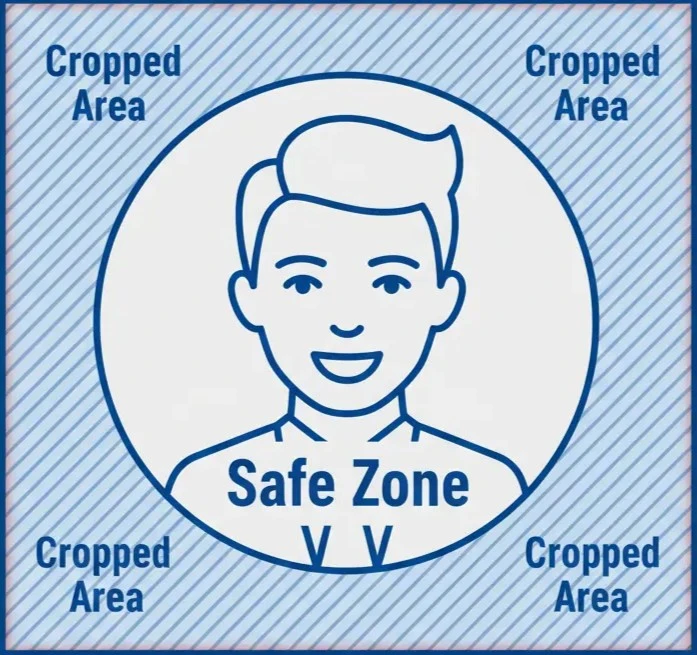
| Aspect Ratio | 1:1 (Square) — but keep the circular crop in mind! |
| File Format | PNG (Best for clarity/no artifacts) or JPG |
| Maximum File Size | 8MB |
| Resolution | 300 DPI (Standard for high-density mobile screens) |
Pro Tip: While you upload a square image, LinkedIn crops it into a circle. This removes roughly 21% of the image corners [6]Autoposting.ai (2025): "LinkedIn Image Sizes Complete Reference Table". Ensure your face and important details (like a blazer lapel) are centered within an invisible "safe zone" in the middle of the frame.
Also looking for banner/header dimensions? See our dedicated guide: LinkedIn Profile Header Image Size 2026 (1584×396px).
# 3. Composition: The "60% Rule"
With over 57% of LinkedIn traffic now occurring on mobile devices [2]Social Shepherd (2025): "41 Essential LinkedIn Statistics You Need to Know in 2025", your headshot must be legible on a screen the size of a business card.
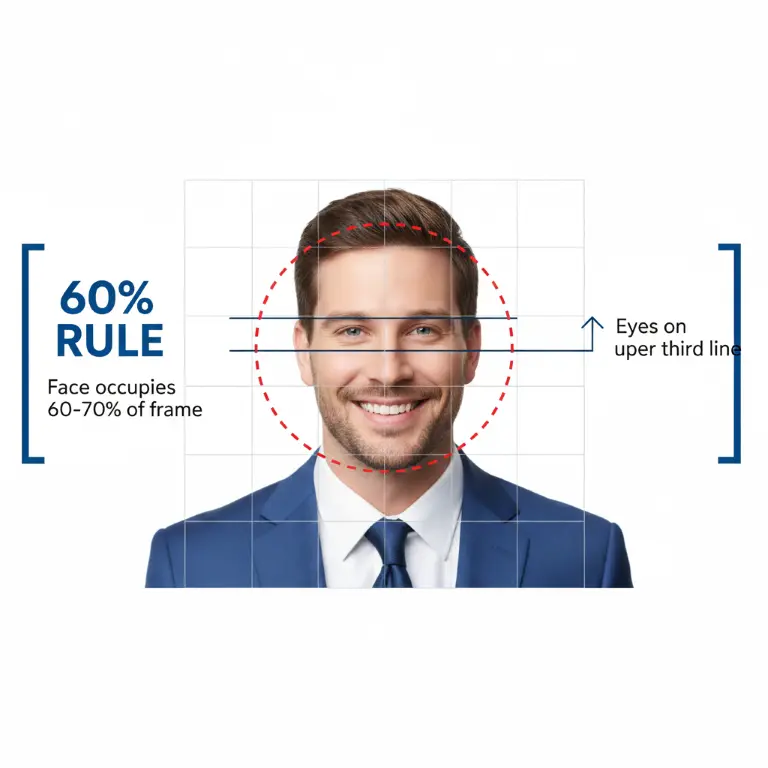
- The 60% Rule: Your face should occupy between 60% and 70% of the frame [1]LinkedIn Official Data / Skrapp (2025). Standing too far back (full-body shots) makes you unrecognizable on mobile, while being too close can feel intrusive.
- The Eye Line: Position your eyes in the upper third of the photo. This creates a natural "gaze" that simulates eye contact with the viewer, which has been shown to release oxytocin, a hormone associated with social bonding and trust [4]ResearchGate: "Perception of Facial Trustworthiness: The Impact of Top and Bottom Facial Cues".
- Backgrounds (The 2026 Trend): The "stark studio white" is being replaced by lifestyle bokeh. A soft, out-of-focus office or outdoor setting adds professional context without distracting from your face.
# 4. The Psychology of the "Scroll-Stopping" Face
Professional headshots aren't just about looking "nice"; they are about projecting competence through non-verbal cues.
The Power of Eye Expression
Research published in Psicothema reveals that while a smiling mouth is important, trustworthiness judgments rely more heavily on eye expression. The study found that incongruence between the eyes and mouth—such as angry or fearful eyes with a smiling mouth—is particularly detrimental to perceived trustworthiness [3]Psicothema: "Trustworthiness of a smile as a function of changes in the eye expression". This is why the "squinch"—a subtle narrowing of the eyes—paired with a genuine smile conveys confidence and authenticity.
The Duchenne Smile
A genuine "Duchenne smile" involves both the mouth and the eyes (creating "crow's feet" wrinkles). Psychologists found that people decide whether to trust a person within 100 milliseconds of seeing their face, and a Duchenne smile is the most powerful signal of trustworthiness and approachability [7]Princeton University Research (Todorov et al.).

# 5. Industry-Specific Attire & Color Theory
Your outfit acts as a visual shorthand for your expertise. In 2026, "authenticity" is the gold standard, but the following color rules still apply:
- Traditional (Law, Finance): Navy blue blazers (conveying trust) or charcoal gray (projecting stability).
- Creative/Tech: "Power Casual"—high-quality knitwear, structured polos, or a sharp blazer over a neutral, high-quality T-shirt.
- Colors to Avoid: Pure white (can "wash out" on bright screens) and neon colors (which distract the viewer’s eye from your face).


# 6. AI Headshots: The 2026 Modern Shortcut
Traditionally, a professional headshot required a $100 - $200 studio session. In 2026, technology has democratized professional branding.
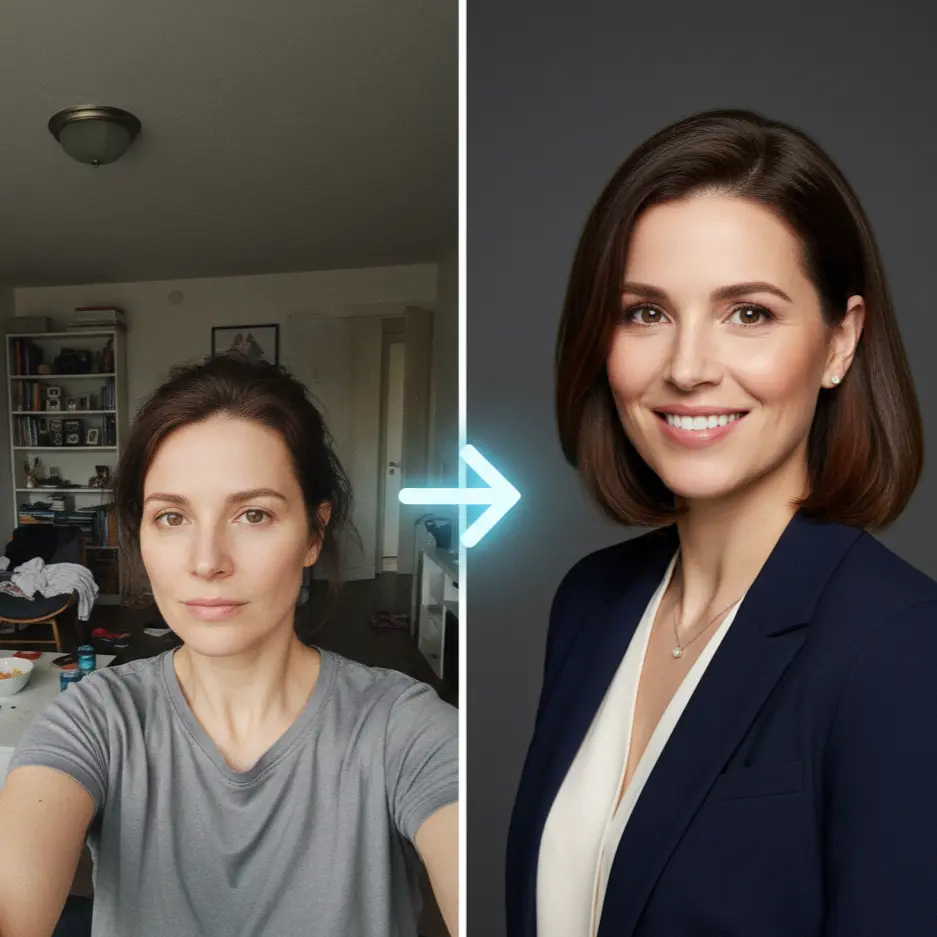
Tools like ProProfilePhoto.com allow you to bypass the studio entirely. By uploading 1-3 existing photos, our AI reconstructs your features into a high-resolution, professional lens format.
🎯 Before you generate new headshots:
Check how your current photo scores with our free Rate My Photo tool. Get instant feedback on what's working and what needs improvement.
- Cost-Effective: Professional results for a fraction of studio prices.
- Speed: Go from "selfie" to "pro" in under 60 minutes.
- Consistency: Ideal for remote teams needing a unified "brand look" for 2026.
# FAQ: LinkedIn Photos in 2026
💡 Not sure if your current photo meets these standards?
Try our free Rate My Photo tool to get an instant AI-powered analysis with a professional score and improvement tips.
Q: Can I use an AI-generated photo for LinkedIn?
A: Yes! As long as the result is a realistic representation of how you look today, AI headshots are widely accepted and increasingly used by professionals at top-tier companies.
Q: Should I use a selfie?
A: Generally, no. Even high-quality selfies usually have "wide-angle distortion" that makes the face look unnatural. Using a tool like ProProfilePhoto corrects this by reconstructing your features in a professional lens format.
Q: Does my photo need to be in color?
A: While black and white can look artistic, color photos are preferred in 2026 as they feel more "human" and approachable.
# Conclusion: Your Next Step
Your LinkedIn profile picture is working for you 24/7. It is your silent advocate in every search result and connection request. If your current photo doesn't project the Confidence, Likability, and Influence you want to be known for, it’s time for an upgrade.
Ready to level up your professional brand?
Generate your 2026 Professional Headshots with ProProfilePhoto and start standing out today.
Get Started NowReferences & Sources
- LinkedIn Official Data / Skrapp (2025): "LinkedIn Profile Optimization Tips for 2025" - Cites 21x views and 36x messages metrics. Source
- Social Shepherd (2025): "41 Essential LinkedIn Statistics You Need to Know in 2025" - Confirms 1.2 billion user milestone. Source
- Psicothema: "Trustworthiness of a smile as a function of changes in the eye expression" - Research demonstrating that trustworthiness judgments depend more on eye expression than the smiling mouth, with incongruence between eyes and mouth being particularly detrimental. Source
- ResearchGate: "Perception of Facial Trustworthiness: The Impact of Top and Bottom Facial Cues on Trust Judgments and Behaviors" Source
- Hopper HQ (2025): "The Ultimate Guide to LinkedIn Dimensions & Post Sizes" - Technical specs for 400x400/800x800 resolution. Source
- Autoposting.ai (2025): "LinkedIn Image Sizes Complete Reference Table" - Detailed circular crop and aspect ratio data. Source
- Princeton University Research (Todorov et al.): Studies on 100ms "thin-slicing" and rapid assessment of trustworthiness. Source
- Uptown Media / Jobvite (2024-2025): "Why Headshots Matter More Than Resumes" - Survey data on hiring manager preferences for professional vs. casual photos. Source